Key Features
- 65-Inch 4K Interactive Display
- Bright 350-Nit Output
- 20-Point Multi-Touch Collaboration
- Responsive Embedded Processing
- Wi-Fi Wireless Screen Sharing
- Reliable 16/7 Operation


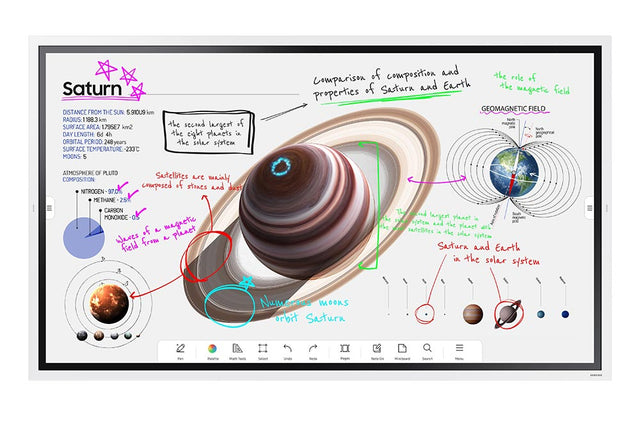
Flip Pro sets the industry standard with exceptional low latency of only 26ms, enhanced by predictive logic to provide a lifelike and seamless drawing experience. With its built-in display boasting 2,048 levels of thickness, creativity is unleashed, allowing users to explore their artistic potential. Additionally, Flip Pro supports multi-touch functionality for up to 20 individuals, enabling enriched interactivity and fostering collaborative engagement.

* When using single touch.
Intuitive writing & drawing
Flip Pro instantly brings ideas to life with its pen and brush modes, offering a realistic writing experience akin to the physical world. The flexible erasing feature allows for effortless removal of content with a simple swipe of your finger or palm. The quick tool and palette menu ensure a smooth creative workflow, enabling ideas to flow seamlessly. With the toggle button, switching to a new note layer user interface becomes a breeze, enhancing organization and productivity.

Versatile connectivity
Flip Pro offers a wide range of connectivity options, such as USB, HDMI, and DP, empowering educators to effortlessly connect any device for accessing content and displaying information on a larger screen. Furthermore, Flip Pro facilitates seamless network connectivity and device integration through its LAN port, while wireless screen-mirroring capabilities allow for easy sharing of screens across multiple devices. This versatility ensures convenient and efficient collaboration and content sharing in educational settings.

* Image simulated for illustrative purposes.
3-in-1 USB-C port
Experience enhanced connectivity with the 3-in-1 USB-C functionality, which facilitates screen mirroring, touch control, and external device charging (up to a maximum of 15W). Educators can effortlessly connect to the USB Type-C port, empowering them to deliver interactive and captivating lessons with ease. This streamlined connectivity option ensures a seamless and hassle-free teaching experience, allowing educators to focus on delivering engaging content without any technical complexities.

* When compared to previous Flip models.
* Images & on-screen contents are simulated and for illustration purpose only.

SmartView+
SmartView+ revolutionizes wireless connectivity by allowing up to 50 devices to connect simultaneously to the interactive display. Additionally, it supports multi-view functionality on up to four screens, eliminating the need for cables during screen sharing. This cable-less screen sharing capability is particularly beneficial for larger meeting rooms and digitized classrooms, where seamless collaboration and engagement are paramount.

* Image simulated for illustrative purposes.
Workspace

* Available apps may vary by region and require service subscription.
Boxlight MimioConnect*
Flip Pro incorporates the MimioConnect app, an online blended learning platform that offers a wide range of versatile learning content accessible through Workspace. Through Samsung's collaboration with leading education solutions providers in the US, innovative educational software is seamlessly integrated, delivering a comprehensive and dynamic educational experience directly to users.

* Requires Boxlight registration and subscription to use this service and the service availability varies by region.
** Images & on-screen contents are simulated and for illustration purpose only.
Video call applications
Flip Pro effortlessly supports hassle-free video conferencing through the WebRTC (Real Time Communication) API, eliminating the requirement for additional solution compatibility. Users can conveniently access apps like Google Duo* with a simple touch, enabling seamless and efficient collaboration. This streamlined approach ensures that video conferencing on Flip Pro is user-friendly and enhances the overall collaborative experience.

* Google Duo compatibility available from Q2.
** Images & on-screen contents are simulated and for illustration purpose only.
*** Webcam is sold separately
**** Supported webcam(9 models) : Logitech C930e, C922, C922x, C925E, C920s, C920, C920-C, C930C, Logitech Stream Cam
Remote content push
With Samsung's MagicINFO Remote Management solution, Flip Pro introduces an innovative feature that enables the delivery of content, alerts, and warnings from the school information system directly to the display. This functionality ensures that teachers and students are promptly notified of important updates, which can be conveniently pushed to Flip displays in every classroom. By leveraging this advanced system, Flip Pro optimizes communication and keeps everyone informed with ease and efficiency.

* Requires MagicINFO license to use this service and SIS(School Information Service) should be separately built and integrated with MagicINFO.
Protective screen technology


$2,219.00
Flip Pro sets the industry standard with exceptional low latency of only 26ms, enhanced by predictive logic to provide a lifelike and seamless drawing experience. With its built-in display boasting 2,048 levels of thickness, creativity is unleashed, allowing users to explore their artistic potential. Additionally, Flip Pro supports multi-touch functionality for up to 20 individuals, enabling enriched interactivity and fostering collaborative engagement.
* When using single touch.
Intuitive writing & drawing
Flip Pro instantly brings ideas to life with its pen and brush modes, offering a realistic writing experience akin to the physical world. The flexible erasing feature allows for effortless removal of content with a simple swipe of your finger or palm. The quick tool and palette menu ensure a smooth creative workflow, enabling ideas to flow seamlessly. With the toggle button, switching to a new note layer user interface becomes a breeze, enhancing organization and productivity.
Versatile connectivity
Flip Pro offers a wide range of connectivity options, such as USB, HDMI, and DP, empowering educators to effortlessly connect any device for accessing content and displaying information on a larger screen. Furthermore, Flip Pro facilitates seamless network connectivity and device integration through its LAN port, while wireless screen-mirroring capabilities allow for easy sharing of screens across multiple devices. This versatility ensures convenient and efficient collaboration and content sharing in educational settings.
* Image simulated for illustrative purposes.
3-in-1 USB-C port
Experience enhanced connectivity with the 3-in-1 USB-C functionality, which facilitates screen mirroring, touch control, and external device charging (up to a maximum of 15W). Educators can effortlessly connect to the USB Type-C port, empowering them to deliver interactive and captivating lessons with ease. This streamlined connectivity option ensures a seamless and hassle-free teaching experience, allowing educators to focus on delivering engaging content without any technical complexities.
* When compared to previous Flip models.
* Images & on-screen contents are simulated and for illustration purpose only.
SmartView+
SmartView+ revolutionizes wireless connectivity by allowing up to 50 devices to connect simultaneously to the interactive display. Additionally, it supports multi-view functionality on up to four screens, eliminating the need for cables during screen sharing. This cable-less screen sharing capability is particularly beneficial for larger meeting rooms and digitized classrooms, where seamless collaboration and engagement are paramount.
* Image simulated for illustrative purposes.
Workspace
* Available apps may vary by region and require service subscription.
Boxlight MimioConnect*
Flip Pro incorporates the MimioConnect app, an online blended learning platform that offers a wide range of versatile learning content accessible through Workspace. Through Samsung's collaboration with leading education solutions providers in the US, innovative educational software is seamlessly integrated, delivering a comprehensive and dynamic educational experience directly to users.
* Requires Boxlight registration and subscription to use this service and the service availability varies by region.
** Images & on-screen contents are simulated and for illustration purpose only.
Video call applications
Flip Pro effortlessly supports hassle-free video conferencing through the WebRTC (Real Time Communication) API, eliminating the requirement for additional solution compatibility. Users can conveniently access apps like Google Duo* with a simple touch, enabling seamless and efficient collaboration. This streamlined approach ensures that video conferencing on Flip Pro is user-friendly and enhances the overall collaborative experience.
* Google Duo compatibility available from Q2.
** Images & on-screen contents are simulated and for illustration purpose only.
*** Webcam is sold separately
**** Supported webcam(9 models) : Logitech C930e, C922, C922x, C925E, C920s, C920, C920-C, C930C, Logitech Stream Cam
Remote content push
With Samsung's MagicINFO Remote Management solution, Flip Pro introduces an innovative feature that enables the delivery of content, alerts, and warnings from the school information system directly to the display. This functionality ensures that teachers and students are promptly notified of important updates, which can be conveniently pushed to Flip displays in every classroom. By leveraging this advanced system, Flip Pro optimizes communication and keeps everyone informed with ease and efficiency.
* Requires MagicINFO license to use this service and SIS(School Information Service) should be separately built and integrated with MagicINFO.
Protective screen technology
Technical Details


We accept Purchase Orders from all Schools, Universities, Major Government Agencies and Not-for-profit Organizations within the United States and Canada Only. All Purchase Orders are subject to approval.
Simply email, fax or mail your purchase order and please ensure your P/O contains the following information:
Please email completed purchase orders to Sales@OfficeWonderland.com .
You can also fax it to: (786) 916-5963
Or mail it to:
OfficeWonderland.comOnce we have all the information requested above, an account and order will be created.
We operate with a Net 30 Day payment arrangement for approved purchase orders. Payment is expected to be made in full not more than 30 days after your order is processed.

Brightness
Weight without stand
Weight with Stand
Duty Cycle
Dimensions
Aspect Ratio
Content
Native Resolution
Lumens (ANSI)
Contrast Ratio
Throw Distance
Lens
Inputs
Outputs
Display Technology
Wireless Networking
Speakers
Economode
Audible Noise
Lamp Life
Short Throw
Aspect Ratio
Image Size Diagonal
Lens Shift
Data / Video Signals
Digital Keystone
Unit Weight
Projector Methods
Dimensions (WxDxH)
Dimensions (WxDxH)
Contrast Ratio
Viewing Angle
Response Time
Sound Output
Screen Size
Monitor Configuration
Display Orientation
WiFi
Communication Port
Refresh Rate
General
VESA Pattern
TAA Compliant
PDF Documents
Diagonal Size
Dimensions
Aspect Ratio
Sensor
Resolution
Signal Sysyetm
Signal To Noise Ratio
Gain
Shutter Speed Range
Exposure Control
White Balance
Image Stabilization
Image Flip
ICR
Sync
Output
Audio Input
Audio
Camera Control
Focal Length
Minimum Object Distance
Pan Angle
Tilt Angle
Pan Speed
Tilt Speed
Presets
Operating Temperature
Power
Power Consumption
Minimum Illumination
Optical Zoom
TAA Compliant