Key Features
- WXGA 1280 x 800
- 6,500 ANSI Lumens
- 1.5–3.0:1 Throw Ratio
- Motorized Lens Shift Control
- Multiple Interchangeable Lens Options


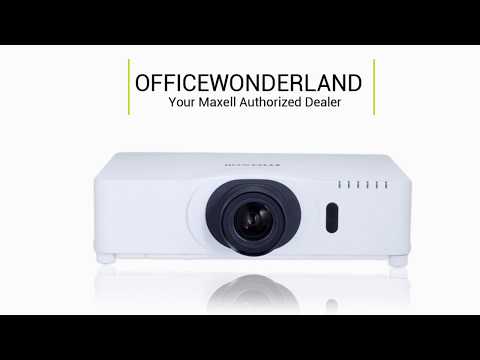
The Easy to use Maxell MC-WX8265 installation projector with advanced features, 6,500 ANSI lumens brightness and WXGA 1280 x 800 resolution in a low profile design.
Product Highlights
Quality, reliability and installation convenience:
From mid-size to very large auditoriums and conference halls, Maxell’s MC-WX8265 LCD projector is the perfect solution. With 6,500 ANSI lumens brightness and WXGA 1280 x 800 resolution, the MC-WX8265 will deliver dynamic images guaranteed to dazzle any audience. Incorporating Maxell’s leading-edge technology, the MC-WX8265 features Maxell’s Accentualizer for advanced image processing, long lamp life, a variety of lens options to accommodate your specific application, and is wireless presentation compatible. Plus, embedded networking gives you the ability to manage and control multiple projectors over your LAN (scheduling of events, centralized reporting, image transfer, and e-mail alerts). Even with the array of advanced features, Maxell’s MC-WX8265 is designed for userfriendly operation and installation convenience.
Accentualizer:
Maxell original technology makes pictures look more real by enhancing sharpness, gloss and shade to make pictures as clear as pictures on a flat-panel device. You can also adjust the effects by three levels according to your surroundings so that the colors of projected images are the actual colors of the objects they represent.
DICOM® Simulation Mode:
The DICOM (Digital Imaging and Communications in Medicine) Simulation Mode projects grayscale images which approximate DICOM Part 14 specifications. This mode is ideal for viewing grayscale medical images, such as X-rays, for training and educational purposes.
The projectors have a DICOM (Digital Imaging and Communications in Medicine) Simulation Mode. This mode simulates the DICOM standard, which is a standard applicable to digital communications in medicine, and is useful for displaying medical images such as X-rays. These projectors are not medical devices and are not compliant with the DICOM standard, and neither the projector nor the DICOM Simulation Mode should be used for medical diagnosis. Comparison photos are simulations.
Multiple Lens Options:
Projectors achieve a brightness of the highest class in the industry by adopting a short arc length lamp with a small F-number lens. There are a variety of lenses to use for this projector, all providing specified projector brightness! In addition to the one ML703 middle throw standard lens, six optional lenses are available: FL701 fixed, SL702 and SL712 short throw, ML713 middle throw, LL704 long throw and UL705 ultra-long throw.
Picture by Picture and Picture in Picture:
Images from two input signals at the same time. Picture by Picture (P by P) enables you to compare two images side by side. Picture in Picture (P in P) enables you to display one image within another image. These functions are handy when you need to compare two sets of data or other material.
360° Rotation:
Display rotation of 360° for creative applications and greater installation flexibility.
Center Lens Design:
This feature makes it easy to align the projector with the center of the screen for faster and trouble-free setup.
Motorized Zoom, Focus and Lens Shift Control:
Allows for greater range of installation possibilities. With the motorized function you can make fine adjustments through the remote control or RS232/IP device.
Perfect Fit 2:
Enables the user to adjust individual corners and sides independent of one another. Perfect Fit 2 provides vertical and horizontal digital correction of either barrel or pin cushion distortions. This feature helps correct geometric and complicated distortions. Perfect Fit 2 allows the projected image to fit correctly to the screen quickly and easily.
Projector Quick Connection App For Mobile Devices:
Our iOS and Android applications offers projector control and also provides the capability to display photos, document files and web site contents. Available for iPad®, iPhone® and Android devices. Works over your LAN via your RJ-45 port or via an optional USBWL11N wireless adapter.
Status Monitor:
With Maxell’s status monitor, you’ll have access in real time to projector diagnostics. Status updates include configuration information, maintenance history, as well as error and alarm messaging. For even greater user convenience, the status monitor can be accessed on the rear input panel or through the Maxell network tools software.
Network Control, Maintenance and Security:
Embedded networking gives you the ability to manage and control multiple projectors over your LAN. Features include scheduling of events, centralized reporting, image transfer and e-mail alerts for reactive and routine maintenance.
PC-Less Presentation:
By using a USB memory stick or other storage device, you can use the projector without a computer. Menus are easy to see with a thumbnail display. Additionally there is also a slideshow function.
PJMessenger:
PJMessenger function allows you to send and display text messages and audio alerts on your networked projectors. It is an easy and efficient way to send announcements out to multiple units.
Wireless Presentation Compatible:
Connect the Maxell’s MC-WX8265 LCD projector to a computer or your network using the optional USB wireless adapter (part number USBWL11N). The adapter supports IEEE802.11b/g and the latest 11n.
$2,499.00
The Easy to use Maxell MC-WX8265 installation projector with advanced features, 6,500 ANSI lumens brightness and WXGA 1280 x 800 resolution in a low profile design.
Product Highlights
Quality, reliability and installation convenience:
From mid-size to very large auditoriums and conference halls, Maxell’s MC-WX8265 LCD projector is the perfect solution. With 6,500 ANSI lumens brightness and WXGA 1280 x 800 resolution, the MC-WX8265 will deliver dynamic images guaranteed to dazzle any audience. Incorporating Maxell’s leading-edge technology, the MC-WX8265 features Maxell’s Accentualizer for advanced image processing, long lamp life, a variety of lens options to accommodate your specific application, and is wireless presentation compatible. Plus, embedded networking gives you the ability to manage and control multiple projectors over your LAN (scheduling of events, centralized reporting, image transfer, and e-mail alerts). Even with the array of advanced features, Maxell’s MC-WX8265 is designed for userfriendly operation and installation convenience.
Accentualizer:
Maxell original technology makes pictures look more real by enhancing sharpness, gloss and shade to make pictures as clear as pictures on a flat-panel device. You can also adjust the effects by three levels according to your surroundings so that the colors of projected images are the actual colors of the objects they represent.
DICOM® Simulation Mode:
The DICOM (Digital Imaging and Communications in Medicine) Simulation Mode projects grayscale images which approximate DICOM Part 14 specifications. This mode is ideal for viewing grayscale medical images, such as X-rays, for training and educational purposes.
The projectors have a DICOM (Digital Imaging and Communications in Medicine) Simulation Mode. This mode simulates the DICOM standard, which is a standard applicable to digital communications in medicine, and is useful for displaying medical images such as X-rays. These projectors are not medical devices and are not compliant with the DICOM standard, and neither the projector nor the DICOM Simulation Mode should be used for medical diagnosis. Comparison photos are simulations.
Multiple Lens Options:
Projectors achieve a brightness of the highest class in the industry by adopting a short arc length lamp with a small F-number lens. There are a variety of lenses to use for this projector, all providing specified projector brightness! In addition to the one ML703 middle throw standard lens, six optional lenses are available: FL701 fixed, SL702 and SL712 short throw, ML713 middle throw, LL704 long throw and UL705 ultra-long throw.
Picture by Picture and Picture in Picture:
Images from two input signals at the same time. Picture by Picture (P by P) enables you to compare two images side by side. Picture in Picture (P in P) enables you to display one image within another image. These functions are handy when you need to compare two sets of data or other material.
360° Rotation:
Display rotation of 360° for creative applications and greater installation flexibility.
Center Lens Design:
This feature makes it easy to align the projector with the center of the screen for faster and trouble-free setup.
Motorized Zoom, Focus and Lens Shift Control:
Allows for greater range of installation possibilities. With the motorized function you can make fine adjustments through the remote control or RS232/IP device.
Perfect Fit 2:
Enables the user to adjust individual corners and sides independent of one another. Perfect Fit 2 provides vertical and horizontal digital correction of either barrel or pin cushion distortions. This feature helps correct geometric and complicated distortions. Perfect Fit 2 allows the projected image to fit correctly to the screen quickly and easily.
Projector Quick Connection App For Mobile Devices:
Our iOS and Android applications offers projector control and also provides the capability to display photos, document files and web site contents. Available for iPad®, iPhone® and Android devices. Works over your LAN via your RJ-45 port or via an optional USBWL11N wireless adapter.
Status Monitor:
With Maxell’s status monitor, you’ll have access in real time to projector diagnostics. Status updates include configuration information, maintenance history, as well as error and alarm messaging. For even greater user convenience, the status monitor can be accessed on the rear input panel or through the Maxell network tools software.
Network Control, Maintenance and Security:
Embedded networking gives you the ability to manage and control multiple projectors over your LAN. Features include scheduling of events, centralized reporting, image transfer and e-mail alerts for reactive and routine maintenance.
PC-Less Presentation:
By using a USB memory stick or other storage device, you can use the projector without a computer. Menus are easy to see with a thumbnail display. Additionally there is also a slideshow function.
PJMessenger:
PJMessenger function allows you to send and display text messages and audio alerts on your networked projectors. It is an easy and efficient way to send announcements out to multiple units.
Wireless Presentation Compatible:
Connect the Maxell’s MC-WX8265 LCD projector to a computer or your network using the optional USB wireless adapter (part number USBWL11N). The adapter supports IEEE802.11b/g and the latest 11n.
Technical Details
We accept Purchase Orders from all Schools, Universities, Major Government Agencies and Not-for-profit Organizations within the United States and Canada Only. All Purchase Orders are subject to approval.
Simply email, fax or mail your purchase order and please ensure your P/O contains the following information:
Please email completed purchase orders to Sales@OfficeWonderland.com .
You can also fax it to: (786) 916-5963
Or mail it to:
OfficeWonderland.comOnce we have all the information requested above, an account and order will be created.
We operate with a Net 30 Day payment arrangement for approved purchase orders. Payment is expected to be made in full not more than 30 days after your order is processed.

Brightness
Weight without stand
Weight with Stand
Duty Cycle
Dimensions
Aspect Ratio
Content
Native Resolution
Lumens (ANSI)
Contrast Ratio
Throw Distance
Lens
Inputs
Outputs
Display Technology
Wireless Networking
Speakers
Economode
Audible Noise
Lamp Life
Short Throw
Aspect Ratio
Image Size Diagonal
Lens Shift
Data / Video Signals
Digital Keystone
Unit Weight
Projector Methods
Dimensions (WxDxH)
Dimensions (WxDxH)
Contrast Ratio
Viewing Angle
Response Time
Sound Output
Screen Size
Monitor Configuration
Display Orientation
WiFi
Communication Port
Refresh Rate
General
VESA Pattern
TAA Compliant
PDF Documents
Diagonal Size
Dimensions
Aspect Ratio
Sensor
Resolution
Signal Sysyetm
Signal To Noise Ratio
Gain
Shutter Speed Range
Exposure Control
White Balance
Image Stabilization
Image Flip
ICR
Sync
Output
Audio Input
Audio
Camera Control
Focal Length
Minimum Object Distance
Pan Angle
Tilt Angle
Pan Speed
Tilt Speed
Presets
Operating Temperature
Power
Power Consumption
Minimum Illumination
Optical Zoom
TAA Compliant