
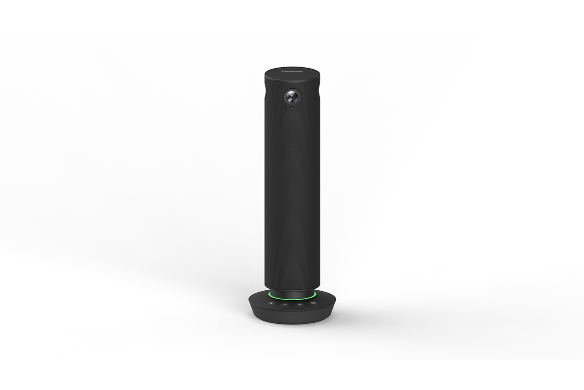
Panasonic PressIT360 TY-CSP1 Camera Speakerphone
Panasonic PressIT360 TY-CSP1 Camera Speakerphone is backordered and will ship as soon as it is back in stock.
- Manufacturer Warranty Included
- Lifetime Technical Support from OfficeWonderland
- No Sales Tax for Qualified Tax-Exempt Organizations
- Purchase Orders Accepted (Net 30 Available)
Purchase Orders & Tax-Exempt
We proudly support schools, universities, government agencies, and qualified businesses.
- Net 30 Purchase Orders
- Tax-Exempt Sales for Eligible Organizations
- W-9 Available Upon Request
- Connect the cable to the PC and start the meeting immediately
- Only one USB-C is needed to connect to a PC
- Easy operation with just the push of a button
- Clear video and audio transmission
- Expand usage scenarios with ease of installation
- Equipped with a 1/4-inch tripod fixing screw hole
Connect the cable to the PC and start the meeting immediately
Simply connect the camera, microphone, and speakers in one unit to a computer with a USB Type-C (hereafter referred to as USB-C) cable. No time is needed to prepare and set up equipment, so meetings can be started smoothly.

1. Bring into the conference room

2. Just connect to a PC using USB-C

3. Start web conference
Only one USB-C is needed to connect to a PC.
Video and audio data can be sent to your PC with a single USB-C. Since the terminal integrates a camera, microphone, and speakers, there is no need to prepare separate equipment.1
1:For connection to a USB-C port of a PC capable of supplying 5V/3A of power. It can also be connected using an AC adapter. When using the USB-C to USB-C alone, volume is limited compared to when using the AC adapter.

Easy operation with just the push of a button
Volume control, muting, and video mode selection can be intuitively operated using buttons on the control panel of the main unit. The LED ring also informs the user of the operating status by color. You can check whether the microphone is on or off, etc., at a glance. In addition, detailed settings for camera position adjustment and image quality change can be made using a dedicated app.

Clear video and audio transmission for natural and realistic communication
Common issues that occur in web conferencing, such as not knowing who is speaking, waiting for someone to speak, and howling can be eliminated.
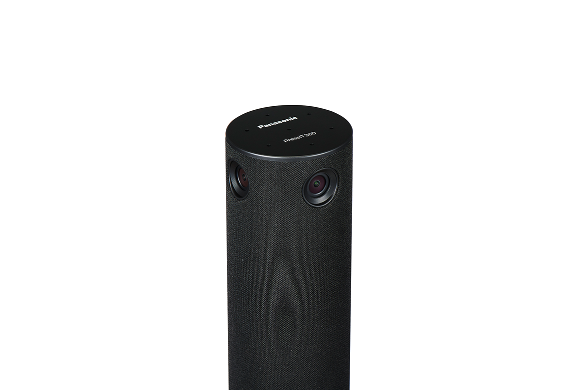
Four cameras capture 360-degree horizontal images, so when placed in the center of a conference room, participants at any seat can be seen in high quality and realistic images. The microphone also cover a wide 360-degree horizontal area and can recognize voices from a radius of up to five meters. The system also features echo and noise cancellation and volume equalization, which automatically adjusts to make it easier to hear participants, eliminating the sound trouble that can be a challenge in web conferencing. The system supports natural communication with people participating in a conference at a distance by collecting and amplifying clear sound.
The original performance may not be achieved depending on the conference system used, Internet connection speed, and bandwidth.

A variety of video modes to choose from according to the situation
It is possible to focus on the speaker or to display a fixed whiteboard
Five different video modes allow meetings to proceed with the camera layout best suited for communication. For example, by using Multi view, a green bar indicating the speaker is lit on the PC on the remote worker, making it easy to recognize the speaker. Remote work participants will be able to read the expressions on the office side of the room and know when to speak up.
Dual view

- 360-degrees view the conference room.
- Focuses on up to two speakers.
Single view

- Focus on the person speaking in the conference room.
Multi view

- Focuses on up to four speakers. Shows a green bar above the speaker screen.
Surround view

- 360-degree overall display divided to two 180-degree screens.
Stable view

- Displays images with a fixed position as a web camera.

The green LED gradation changes in the direction of the speaker's voice.
- This function may not be activated in certain modes
Focus on the person speaking is automatically optimized according to the volume of speech and the length of the utterance. Focus may be delayed or not performed depending on the situation.
Expand usage scenarios with ease of installation
Functional size and sophisticated design
Diameter 64 mm(2.52"), height 285 mm(11.23"), weight approx. 950 g(2.1 lbs.).
The slim shape and seamless fabric netting create a discreet appearance that is unobtrusive even when placed in the center of a conference table. The camera captures the participants' faces at an optimal angle of incidence without overlapping with the computer, so you can concentrate on the discussion without worrying about the equipment.
Laptop for business
- Windows: Lenovo (Thinkpad L15 15.6 inch), HP(250 G8 15.6 inch), Dell (Vostro 15.6 inch),
- Mac: MacBook Pro (max size 16 inch)


Equipped with a 1/4-inch tripod fixing screw hole
The bottom of the unit is equipped with a 1/4-inch screw hole, so it can be fixed to a tripod and permanently installed in a location other than on a desk. It is also equipped with a Noble Wedge lock security slot1, which can be connected to a security wire to protect valuable equipment from being stolen in case of theft.
1: Mounting surface Φ11 mm or less.

More detailed settings, such as camera position adjustment and image quality changes, can be made on the PC.
The PressIT app built into the unit can be installed on a PC to perform detailed settings.
- Display of camera images
- Video control (zoom in/zoom out, tilt up/down, pan left/right) *May not work on some models.
- Image quality adjustment
- Speaker operation test
- Firmware update and version confirmation
Supporting operation systems for the PC app are Microsoft Windows (Windows 10/11), and macOS.

-
General
We accept Purchase Orders from all Schools, Universities, Major Government Agencies and Not-for-profit Organizations within the United States and Canada Only. All Purchase Orders are subject to approval. Simply email, fax or mail your purchase order and please ensure your P/O contains the following information:
- Contact name, email address & telephone number Note: An email address is required to receive order/shipping confirmation
- Billing name & address
- Shipping address
- Tax ID# (for tax Exempt orders, please see TAX EXEMPT section below)
- Purchase Order Number
- Date needed (please note: Up to 3-5 days are needed to process requests. This does not include delivery time.
- Authorized signature (Your purchase order can only be accepted when accompanied by the signature of the officer authorizing the purchase and when submitted on your organization's official purchase order form or letterhead.)
- Purchase orders must be in excess of $75 (excluding shipping). All prices are in USD$
- Sales tax is charged only on orders shipping to the state of FL
Please email completed purchase orders to Sales@OfficeWonderland.com.
You can also fax it to: (786) 916-5963 or mail it to:
OfficeWonderland.comAttn: Purchase Orders
20400 NE 16th PL
North Miami Beach, FL 33179
Once we have all the information requested above, an account and order will be created.
Please note the following:
- Please allow 3-5 days for us to process requests
- Confirmation emails are sent when the order is placed & another email is sent when the order ships
- Please make all checks payable to OfficeWonderland Ltd. at the address referenced above.
- Payments on PO orders are due within 30 days
- You can download a copy of our W-9
Looking for the W-9 form?
- Click here to download the latest version of the IRS W-9 form.
Terms
We operate with a “Net 30 Day" payment arrangement for approved purchase orders. Payment is expected to be made in full not more than 30 days after your order is processed.
